K8s at Home With k3s
Disclaimer: In this post, I discuss hosting applications in a home setting. I haven’t done any security hardening yet, so don’t rely on instructions given here to build a system that has to process sensitive information.
I have wanted to host my own privacy friendly apps for a while and I have recently made some space where I could put a server. I want to learn more about infra, so I have set up a one node k8s cluster on it. While I have worked on mature applications that are hosted in the cloud via k8s, it was interesting to go greenfield and figure out how to make my apps reachable from the public internet.
In this post, I will document the work I have done so far. There are likely to be followups as I learn more about security hardening and general operational maintenance.
I’ll be talking about software products & specific bits of hardware, but I don’t have any financial incentive to do so.
Hardware
A friend donated his old gaming PC to the cause, which means it’s massively overspecced1.
The CPU I’m using doesn’t have built in graphics. With default configurations my BIOS won’t boot without a GPU, and it won’t even render the settings dialog on screen. So even though the server is running headless, I needed to borrow a graphics card for the initial setup.
The only thing I did have to buy myself were some storage drives. To provide some protection against data loss, I wanted to run to drives in RAID. I bought two 2TB HDDs, chosen by going to geizhals.de2, filtering on capacity, size (2.5”), and “geeignet fuer Dauerbetrieb” (suitable for constant operation). I then picked drives from two separate manufacturers, to avoid correlated faults3.
OS Configuration
Perhaps unwisely, I’m running Arch Linux, since it’s been very stable in my experience and I’m most familiar with it.
RAID
The mainboard I’m using promised to offer “hardware RAID”. Turns out, that’s what’s known as fake RAID, which is basically a scam.
Getting fake RAID to work on Linux looked really painful and wouldn’t have been worth it, so, I’m using RAID1 with mdadm.
On top of RAID, I use LUKS for full disk encryption. The two drives, then, are set up like this:
% lsblk --output NAME,SIZE,TYPE
NAME        SIZE TYPE
sda         1.8T disk
├─sda1        1G part
├─sda2      128G part
└─sda3      1.7T part
  └─md127   1.7T raid1
    └─root  1.7T crypt
sdb         1.8T disk
├─sdb1        1G part
├─sdb2      128G part
└─sdb3      1.7T part
  └─md127   1.7T raid1
    └─root  1.7T crypt
The boot partitions sda1 and sdb1 are redundant copies of each other, mounted at /boot and /boot.b/, respectively. I make sure that when mkinitcpio is run (either manually or after a system update) or when I change the grub config, I run the respective update commands twice, for both boot partitions.
The sdX2 partitions are swap. I only use sda2, the other one is there mostly for symmetry.
The sdX3 partitions are combined in RAID1, on top of which sits the LUKS encrypted root partition.
The LUKS partition is encrypted using a password, but since the server runs headless, booting it would be annoying. I have therefore added a key stored on a USB drive, allowing the server to boot when the drive is plugged in:
# dd if=/dev/urandom of=/root/keyfile bs=1024 count=4
# chmod 600 /root/keyfile
# dd if=/dev/sdc bs=1024 count=4 | sudo cmp /root/keyfile -
# cryptsetup luksAddKey /dev/md127 /root/keyfile
# cryptsetup luksOpen --test-passphrase /dev/md127 --key-file /root/keyfile
The above generates a key, writes it onto the raw USB device (destroying any data on there in the process), verifies the key, adds it to the LUKS volume, and checks that the new key can be used to unlock the drive.
To mount the root partition on startup, I had to modify the kernel command line:
# /etc/default/grub
GRUB_CMDLINE_LINUX_DEFAULT="loglevel=3 quiet cryptdevice=/dev/md127:root cryptkey=/dev/sdc:0:4096 root=dev/mapper/root mitigations=auto,nosmt"
and regenerate grub.cfg, of course4.
Configuring a keyfile significantly reduces the security of the setup. Someone analysing the unencrypted boot partition could easily determine that a keyfile exists (and go looking around my house for the USB). However, since the server is online most of the time, the key is accessible in memory anyway. My threat model here is an unsophisticated burglar carrying the PC out, or me decommissioning the server and putting the drives in a drawer until who knows who finds them again. Perhaps one day I’ll use a biometric YubiKey or put the drive in a safe, but for now just having them encrypted at all is enough for me.
Hostname
Global ssh access
My ISP is hiding me behind CG-NAT, meaning that DynDNS would not work. Instead I’m using cloudflare tunnels. On the server, I followed Cloudflare’s instructions (Zero Trust -> Networks -> Connectors -> Create a tunnel) to install cloudflared and make the tunnel persist between reboots.
On the free tier of Cloudflare, SSH access is only possible using cloudflared on the client. This is not a major issue however, it just requires an entry in .ssh/config.
ssh.example.com:
	ProxyCommand cloudflared access ssh --hostname %h
It turns out that cloudflared is also available in busybox, which means I can access the server from my phone using Termux by running
pkg install cloudflared
and using the same .ssh/config entry as above.
K3s
In looking for a way to host k8s without too much effort, I came across k3s, which is a low overhead k8s implementation, suitable for small clusters and IoT devices. Since I was only planning on having one node, this is a good fit.
I’m using k9s for an efficient, user-friendly k8s interface.
Installation
I initially tried installing via AUR, but ran into issues so defaulted to the recommended
curl -sfL https://get.k3s.io | sh -
I tell myself it’s the same thing.
Access
I just
export KUBECONFIG=/etc/rancher/k3s/k3s.yaml
sudo chmod 777 $KUBECONFIG  # !!! SECURITY RISK !!!
kubectl get pods --all-namespaces
and then scp it over to my dev machine, replacing 127.0.0.1 with the local network hostname. Definitely something to look at during hardeining…
Applications
Currently I’m running a matrix server for secure communication, nextcloud for calendaring & expense tracking, and syncthing for low-effort backups.
Deployment
I use helm to manage deployments. There are a lot of ready-made helm charts from projects such as k8s at home, and some services also publish their own helm deployments. Looking for $service_name helm chart usually got me to a useful Github repo right away.
Many of the charts are years old, but mostly work anyway. I just have to find the newest image version on docker.io and set it in the values.yaml.
Initially I would have one main chart per application, e.g. homelab-nextcloud, and a subchart pulled from a remote repository (in this example, this one), symlinked into the charts directory of the main chart.
However, I sometimes had to modify the downloaded helm chart a bit, which I think defeats the point of having a top level chart.
Ingress
This was the bit that I was dreading, but it’s actually not difficult to set up. k3s by default deploys traefic as a reverse proxy, which allows me to make the application addressable from outside the cluster by setting the service type to loadBalancer. By default, every k3s node is running a load balancer service, so every node can serve as an ingress into the cluster.
So the first step is just to configure the service something like this:
apiVersion: v1
kind: Service
metadata:
  name: my-service
spec:
  ports:
    - protocol: TCP
      port: 80
      targetPort: 9376
  type: LoadBalancer
Assuming the service has some curlable endpoint, you can check that this works by running the following on the node:
curl -H "Host: my-service" localhost:80/healthcheck-or-whatever
If all is configured correctly, traeffic will use the Host header to route the request to the service.
To make the service available globally, I set up a cloudflare tunnel for each service. For example for the Matrix server, tuwunel:
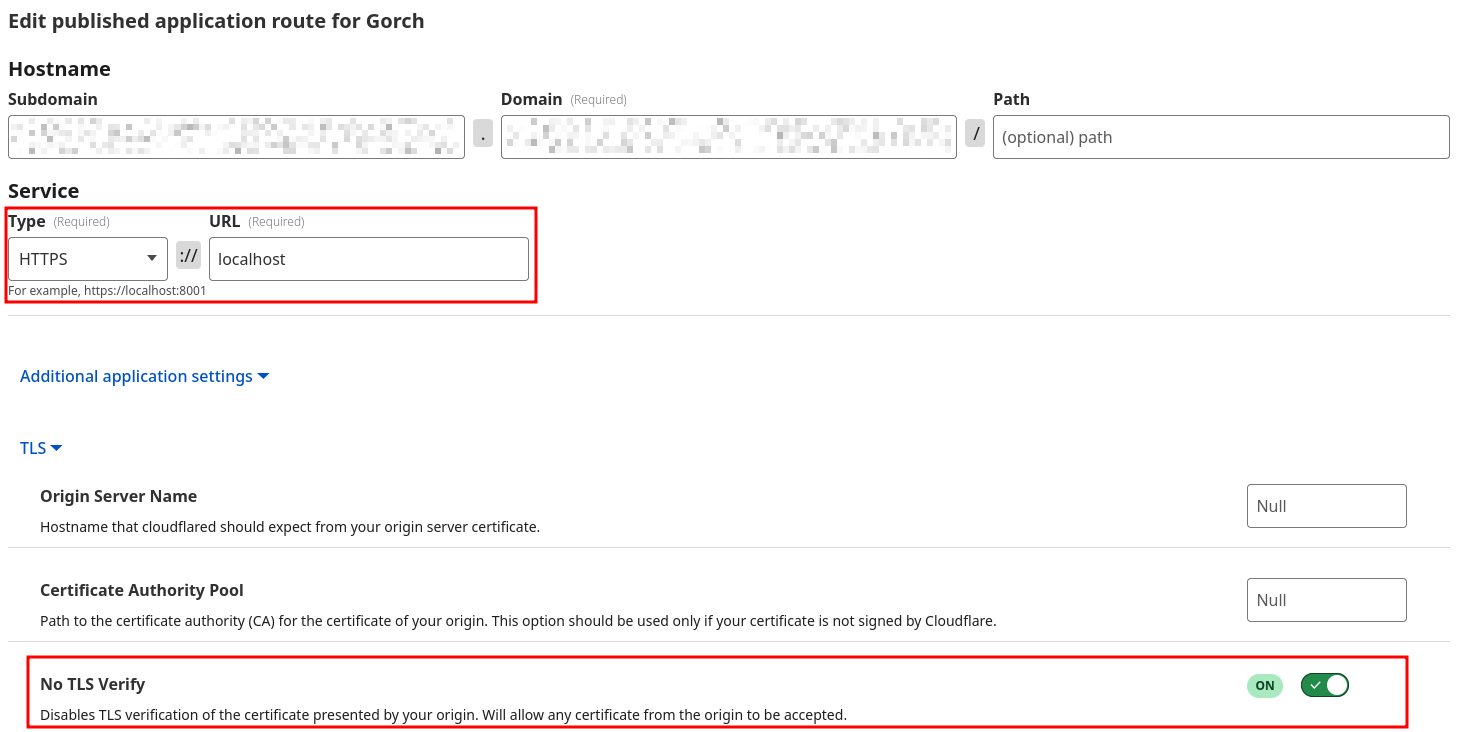

I instruct cloudflare to set the correct Host header and to ignore the fact that my TLS certificates are self-signed. One thing to note here is that since cloudflare does its own TLS termination, they are in principle in a position to snoop on my traffic. This is fine for matrix, since it’s encrypted end-to-end at application level, but is a privacy risk in principle. In the medium term, I will probably transition to using wireguard or tailscale, with an ingres hosted on a cheap VPS.
Persistence
Again, k3s has a very helpful default configuration: Setting StorageClass to local-path will automatically save files on the file system of the node, as long as the application helm chart is set up to support persistence. You can verify this is working by listing the persistent volume claims once the application has spun up. It should look something like this:
% kubectl get pvc
NAME                                  STATUS   VOLUME                                     CAPACITY   ACCESS MODES   STORAGECLASS   VOLUMEATTRIBUTESCLASS   AGE
data-nextcloud-postgresql-0           Bound    pvc-XXXXXXXX-XXXX-XXXX-XXXX-XXXXXXXXXXXX   32Gi       RWO            local-path     <unset>                 11d
matrix-tuwunel-data                   Bound    pvc-XXXXXXXX-XXXX-XXXX-XXXX-XXXXXXXXXXXX   16Gi       RWO            local-path     <unset>                 23d
nextcloud-nextcloud                   Bound    pvc-XXXXXXXX-XXXX-XXXX-XXXX-XXXXXXXXXXXX   32Gi       RWO            local-path     <unset>                 15d
redis-data-nextcloud-redis-master-0   Bound    pvc-XXXXXXXX-XXXX-XXXX-XXXX-XXXXXXXXXXXX   8Gi        RWO            local-path     <unset>                 16d
syncthing                             Bound    pvc-XXXXXXXX-XXXX-XXXX-XXXX-XXXXXXXXXXXX   256Gi      RWO            local-path     <unset>                 18d
Nextcloud details
One thing worth noting about the nextcloud setup: Since it’s a very small setup for less than 10 people, I thought using the sqlite backend would be fine. However, CalDAV requests coming from mobile devices would result in UniqueKeyViolation errors on the server and ultimately in 500 errors. This was fixed by migrating to postgres, using these instructions.
What’s next?
The next thing I want to do here is to do some security hardening. Changing defaults, enabling security auditing, doing my own TLS termination and whatever else I can figure out on the way. I also want to get an understanding of power consumption.
Another thing to do is to set up regular backups of the PV data on an external machine, perhaps using asymmetrically encrypted S3 backups.
-
Also, there is a lot of RGB. ↩
-
There used to be skimflint.co.uk but it has been discontinued. Your options are to use AI, use a different aggregator, or learn German. ↩
-
The advice I’ve heard here is to avoid having multiple drives from the same manufacturing batch. But I don’t know how to do that other than using entirely different vendors. It’s probably not a big deal, but it costs me nothing to do. ↩
-
This assumes that the USB is plugged into a specific port. The USB name contained a colon, which I couldn’t figure out how to escape correctly. My choices were either to hardcode the port or to mess with the
udevscript which inserts the colon (why would you ever?), so I chose to tactially retreat. ↩